When we look to improve the stability and performance of our home network, it's common to wonder what an Ethernet cable is and why it remains so important in the era of WiFi. Understanding what an Ethernet cable is helps us see how data travels between the router and our devices, and why wired connections tend to deliver better results.
What is an Ethernet cable and how does it affect connection speed?
14 min read
)
An Ethernet cable connects devices to the router via a fast, stable wired connection. Its category sets the maximum speed it can transmit, from 100 Mbps to more than 10 Gbps, notably improving internet performance.
Knowing what an Ethernet cable is and how it affects connection speed is key to choosing the right type and making the most of the contracted speed with our internet provider.
Knowing in detail what an Ethernet cable is also helps us differentiate it from other connection methods and understand why it remains the preferred option in environments where stability is essential, such as offices, schools or gaming spaces. Although WiFi has come a long way, wired connections still offer advantages that can't always be matched wirelessly.
Another important aspect is that, in understanding what an Ethernet cable is, we also learn how its category, its build quality and its length can directly affect the real speed we receive. We often think slowness comes from the internet provider, when in fact the problem is an old or damaged cable that limits performance.
Finally, understanding what an Ethernet cable is lets us make more informed decisions when setting up or improving our home network. Choosing the right cable can make the difference between an unstable connection and a smooth experience, especially in bandwidth-hungry activities such as video calls, online gaming or high-resolution streaming.
What is an Ethernet cable? Function, uses and features
An Ethernet cable is a fundamental element in any home or professional network. It is a network cable designed to connect devices such as computers, televisions, consoles or routers, letting data travel quickly, stably and securely.
Unlike Wi-Fi, which depends on radio waves and can suffer interference, the Ethernet cable offers a direct connection that guarantees more consistent performance, especially in demanding tasks such as streaming in high resolution, online gaming or remote work.
This type of cable uses the standard RJ45 connector, present in virtually all modern network equipment. Its performance depends on several key factors: the cable's category, which sets the speed and frequency it can handle; the shielding, which protects against external interference; and the build quality, which affects signal stability. Understanding these features is essential to choose the right cable and make the most of your internet connection speed.
The role of the Ethernet cable
The main role of the Ethernet cable is to establish a physical connection between two devices within a local network. This connection lets data be transmitted with a stability that Wi-Fi can't always match. That's why it remains the preferred option in environments where reliability is a priority: offices, schools, content creation studios or homes with high-speed fibre.
Uses of this type of cable
The Ethernet cable is an essential tool in any modern network thanks to its ability to deliver a fast, stable, secure connection. Its main use is to enable direct communication between devices within a local network, ensuring a steady flow of data without the typical interruptions of wireless connections. This makes it the preferred option for anyone needing the maximum performance in their internet connection.
One of its standout uses is its role in work and productivity environments, where stability is essential. Devices such as office computers, servers, network printers or videoconferencing systems run more efficiently when connected by cable, avoiding cutouts and cutting latency.
At home, the Ethernet cable is especially useful for smart TVs, gaming consoles and streaming devices, which require a constant bandwidth to play high-resolution content without interruption. It is also the best option for online gamers, since it minimises delay and improves real-time responsiveness.
Another important use is its ability to make the most of the contracted speed with the internet provider. While Wi-Fi can be affected by walls, interference or congestion, the Ethernet cable delivers the real speed in a far more consistent way, which is ideal for high-speed fibre connections.
Finally, the Ethernet cable is essential in structured network installations, such as offices, schools or smart buildings. Its reliability and durability make it possible to build robust, secure, scalable networks able to handle large volumes of traffic without loss of performance.
Basic features of an Ethernet cable
Ethernet cables stand out for a series of features that directly affect their performance.The category (Cat) is one of the most important aspects, as it defines the maximum speed and frequency the cable can handle. For example, a Cat5e cable allows speeds of up to 1 Gbps, while a Cat6 keeps that gigabit with greater stability and a higher frequency. The more advanced categories, such as Cat6a or Cat7, reach 10 Gbps and are aimed at more demanding networks or professional installations.
Another key element is the shielding, which may be non-existent (UTP) or present at different levels (STP, S/FTP). Unshielded cables are cheaper and enough for most homes, while shielded ones reduce interference and are ideal in environments with many cables or electrical devices. Finally, the RJ45 connector is the universal standard that ensures compatibility between devices and eases installation.
Summary table of Ethernet cable features:
Element
Description
Examples / Details
Function
Connect devices to a local network or to the internet
Router-PC, router-TV, LAN
Connector
RJ45, universal standard
Compatible with all categories
Categories
Set speed and frequency
Cat5e (1 Gbps), Cat6 (1 Gbps/250 MHz), Cat6a/Cat7 (10 Gbps)
Speed
Transfer capacity
1000 Mbps, 10 Gbps
Frequency
Amount of simultaneous data
100–600 MHz
Shielding
Protection against interference
UTP, STP, S/FTP
Advantages
Stability, low latency, security
Ideal for gaming, streaming, remote work
Types and categories of Ethernet cables
Not all Ethernet cables are the same. Although they may look similar on the outside, inside the quality of the materials, the build and, above all, the performance changes: maximum speed, frequency, ability to avoid interference and optimal usage distance. That's why there are different categories (CAT), each designed for a type of network and a specific need.
Knowing these types and categories is key not to "throttle" your connection: there's no point having 1 Gbps fibre if the cable you use only supports 100 Mbps. Choosing the right Ethernet cable lets you really make the most of the performance you're paying for.
What CAT5e, CAT6, CAT7 and CAT8 really mean
The word "CAT" comes from category and is followed by a number and, sometimes, a letter.Each category indicates the minimum performance the cable must meet.
CAT5e: evolution of the old CAT5. It is today the recommended minimum standard. It supports speeds of up to 1 Gbps over typical home and small-office distances.
CAT6: improves on CAT5e in internal design and shielding. It keeps 1 Gbps more stably and can reach 10 Gbps over short distances.
CAT6a: the "augmented" version of CAT6. Designed for networks up to 10 Gbps over longer distances.
CAT7: aimed at more professional environments, with advanced shielding and higher frequencies. It keeps 10 Gbps and offers better protection against interference.
CAT8: the most modern in the advanced domestic/professional realm. Designed for data centres and very fast networks, with higher speeds and more controlled distances.
You don't always need the highest category. The key is to align the cable's category with your connection speed and your usage demands.
Differences in speed, capacity and shielding level
A higher category doesn't only mean greater speed or more megabits — it also changes the frequency the cable supports and the level of protection (shielding) against interference.
Speed: measured in Mbps or Gbps, it indicates how much data can pass per second.
Frequency (MHz): the higher it is, the more information can circulate at the same time without degrading.
Shielding: ranges from unshielded cables (UTP) to cables with per-pair and overall shielding (S/FTP), which protect better against electrical noise, very important in complex installations.
Summary of the differences in an Ethernet cable by category:
Category
Typical speed
Approximate frequency
Recommended use
CAT5e
Up to 1 Gbps
~100 MHz
Homes and standard SMEs
CAT6
1–10 Gbps*
~250 MHz
Demanding homes, small offices
CAT6a
Up to 10 Gbps
~500 MHz
High-demand networks
CAT7
Up to 10 Gbps
~600 MHz
Professional environments with high noise
CAT8
>10 Gbps (short distances)
≥1600 MHz
Data centres, very specific use
*10 Gbps usually over shorter distances.
How to choose the right Ethernet cable category for your case
It's not about buying "the most expensive" but what makes sense for your scenario.
For most homes:
CAT5e or CAT6 is more than enough if your connection is up to 1 Gbps.
CAT6 offers a little more room for the future and tends to have better shielding.
For demanding homes and small offices:
CAT6a is an excellent option if you're close to or planning to reach 10 Gbps on the internal network.
Ideal for those moving large files on the local network (video editing, home servers, NAS).
For large offices or environments with much interference:
CAT7 (and in very specific cases, CAT8) may make sense for their better shielding and capacity.
Widely used where electrical wiring, machinery, many network devices and long runs coexist.
In short: if you don't have very specific needs, CAT6 is usually the best balance between price, performance and future-proofing.
How the Ethernet cable affects connection speed
The Ethernet cable can be a bottleneck or a great ally. Its influence on the connection speed comes from three main factors:
Cable category: if you use a cable in a category lower than what your connection supports, you'll be limiting the speed. For example, if you have 1 Gbps of fibre but a cable designed only for 100 Mbps, you'll never see the real gigabit.
Condition and quality of the cable: heavily bent, damaged or low-quality cables, or those with connectors in poor condition, can cause packet loss, cutouts or variable speeds.
Length and environment: in very long runs of tens of metres, or routing near electrical cables and interference sources, a cable with better shielding and a higher category holds the signal better.
It also affects latency, that is, the time it takes for information to go back and forth.A good cable reduces micro-cuts, errors and packet retransmissions, which translates into a sense of greater fluidity, especially in online gaming, video calls and remote work.
In practice, the right cable in good condition lets you get much closer to the real speed your provider offers, while a bad or old cable can give you the false impression that "the fibre is slow".
Where to connect an Ethernet cable and how to install it correctly
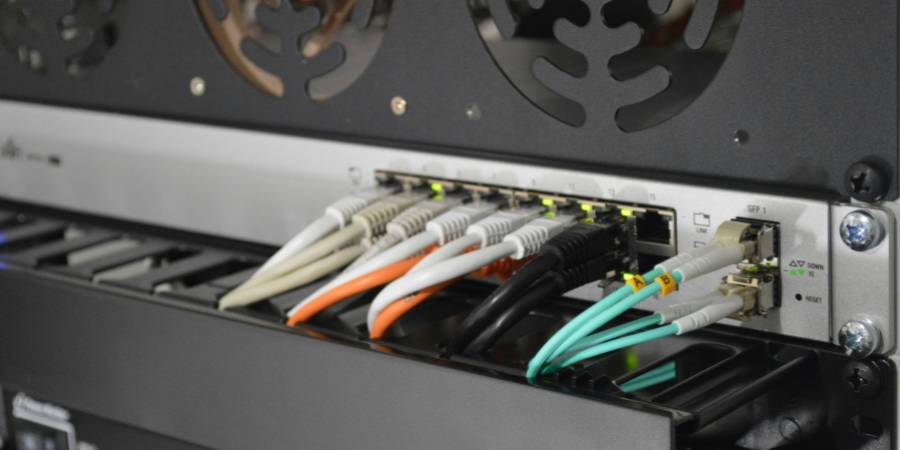
An Ethernet cable always connects two points on the network: for example, router ↔ computer, router ↔ TV, switch ↔ console, etc. The ends of the cable terminate in an RJ45 connector, which slots into the network ports of each device.
Installing a cable properly isn't just "plugging it in" — it also means thinking about the route, avoiding tension and protecting it from wear.
RJ45 ports: connections in router, computer and other devices
RJ45 ports are usually clearly labelled:
On the router:
They are usually grouped and labelled LAN.
There are usually several ports for connecting different devices by cable.
On the computer (desktop or laptop):
On desktop PCs it is usually on the back.
On modern laptops it sometimes no longer exists and a USB-to-Ethernet adapter is needed.
On other devices:
Smart TVs, consoles, TV set-top boxes, access points, switches, etc., usually include an RJ45 port for wired connection.
Basic installation consists of pushing the RJ45 connector in until you hear the small "click" that indicates it has seated. The connector has a plastic tab that prevents it from coming loose by accident.
Installation recommendations: homes vs. offices
The needs of a home and an office aren't the same, and that is reflected in how the cabling should be installed.
In homes:
Simple routes: wall edges, skirting boards, discreet trunking.
Flexible cables: easy to route behind furniture or around doors.
Recommended category: CAT5e or CAT6, unless you have a very demanding home network.
Moderate length: you normally won't have extremely long runs, so the type of shielding tends not to be critical.
In offices or professional spaces:
Structured installation: trunking, trays, suspended ceilings, communications cabinets.
Planning: separate network wiring from electrical wiring whenever possible.
Shielding: consider STP or S/FTP cables if there is much potential interference.
Category: CAT6a or CAT7 if intensive use is expected, with multiple users and critical services.
In both cases it's important to avoid bending the cable at sharp angles, stepping on it continuously or putting it under excessive tension. All of this extends its service life and preserves signal quality.
Ethernet vs WiFi: which is best for each situation
Ethernet and WiFi are not enemies, but complementary. Each has its advantages and fits better in certain situations, as summarised in this table:
Summary of Ethernet vs WiFi differences:
Feature
Ethernet (cable)
WiFi (wireless)
Stability
Very high
Variable
Real speed
Very close to the contracted speed
Depends on distance, interference, saturation
Latency
Very low
Higher
Mobility
Limited
Very high
Installation
Requires cabling
Simpler
Security
Easier to control
Depends on encryption and configuration
When Ethernet is better:
Competitive online gaming.
Streaming in 4K or higher.
Remote work with video calls and constant remote access.
Home servers or NAS.
Equipment that rarely moves (desktop PC, Smart TV, fixed console).
When WiFi is more practical:
Mobile devices (phones, tablets, laptops that move around a lot).
Areas where you don't have trunking or cable runs.
Occasional or light internet use: browsing, social media, email, etc.
The ideal in many cases is to combine both: use Ethernet for the important, fixed things and WiFi for the mobile, secondary ones.
Keys to a fast, stable network: cabling, router and environment
The Ethernet cable is just one piece of the puzzle. For a really stable, fast network, several elements come into play:
Suitable cabling: the right category, good condition, reasonable length, no extreme bends.
Quality router: one that supports the contracted speed, with 1 Gbps ports (or more) and good traffic management.
Physical environment: avoid interference, separate network cables from electrical ones whenever possible, good ventilation for the router and network equipment.
Correct configuration: updated firmware, good device management, WiFi well configured to complement the cabling.
If one of these elements fails, it can give the impression that "the cable isn't any good", when in reality the problem lies elsewhere in the chain.
Difference between Ethernet and Internet: concepts not to be confused
It's very common to confuse Ethernet with the Internet, but they aren't the same:
Ethernet is a local area network technology. It defines how devices communicate with each other through cables (there is also Ethernet over WiFi, but cable is the classic form).
The Internet is the global network connecting millions of networks around the world. Your router uses Ethernet to connect your devices to the local network and, through it, gives you access to the Internet.
Put another way: Ethernet is the "path" inside your home or office; the Internet is the "outside world" you reach by using that path.
Conclusion: choose the right cable to improve your connection
Choosing the right Ethernet cable is one of the simplest, most effective ways to improve your connection experience. A cable of the right category, well installed and in good condition, can make the difference between an unstable connection and a smooth network, especially in tasks demanding high bandwidth and low latency.
For most users, a well-installed CAT6 is a smart investment that combines present and future. If your needs are more specific (large office, professional environment, intensive deployment), moving up to CAT6a or CAT7 may make sense. What matters is that the cable is aligned with your contracted speed, how you use the network and the environment where you install it.